How to put Content Studio articles on your own domain with reverse proxy — without tanking SEO or Core Web Vitals
· 8 min read

Former Product Lead, JPMorgan Asset Management, AIA & AXA
Use Quratic Content Studio to turn visibility gaps into rich articles, reverse-proxy them onto your brand domain for SEO, and keep Core Web Vitals high — with a real walkthrough from Gup.
On this page
The best AI-visibility content is useless if it lives on a subdomain nobody links to — or if the reverse proxy that moves it onto your brand domain wrecks SEO signals and page speed. This post is the practical playbook: how teams use Quratic Content Studio to close tracked gaps, ship rich articles, put them on their own domain with a reverse proxy, and keep Core Web Vitals (CWV) in good shape.
We will use a live example from Gup — a knowledge-grounded AI support product for e-commerce brands — whose resource articles are authored in Content Studio, hosted on a Quratic custom domain, and served to buyers at www.gup.app/resources/....
The problem reverse proxy solves
Content Studio publishes to a Quratic preview host (and, on Pro+, a custom domain such as resources.yourbrand.com). That is the right place to host: static HTML, structured data, markdown alternates, sitemap, and IndexNow.
Many brands still want the buyer-facing URL on the main site:
| Host | Role |
|---|---|
resources.brand.com or {slug}.quratic.org | Where Quratic serves the HTML (origin) |
www.brand.com/resources/... | Where customers and Google should treat the article as “yours” |
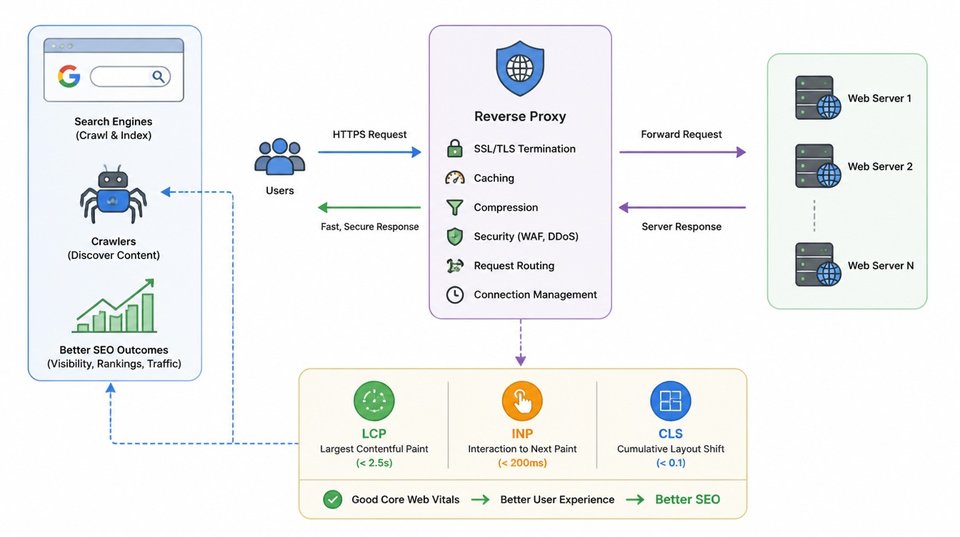
A reverse proxy (or edge rewrite) fetches the Quratic-hosted page and returns it under the main-site path. Done well, you keep Quratic’s content pipeline and your brand’s URL hierarchy. Done poorly, you get duplicate URLs, wrong canonicals, and a heavier page that fails CWV.
Step 1: Start from a real visibility gap
Do not invent topics in a vacuum. In Quratic:
- Track prompts in your market (e.g. Hong Kong) across ChatGPT, Perplexity, and Google AI Mode.
- Open Opportunities for prompt gaps, query fan-out gaps, and citation gaps.
- Turn a ranked gap into an Impact Brief or send it straight into Content Studio.
That is how Gup-style category content stays tied to questions buyers actually ask AI — not a generic “support software” keyword list. For the product story behind Content Studio itself, see why we built it.
Step 2: Draft a rich, extractable article in Content Studio
Inside a Content Studio session:
- Generate from the gap so the draft inherits prompt evidence and sub-intents.
- Structure for extraction — answer-first headings, FAQ blocks, clear entities (brand, product, market).
- Add readiness work — meta description, JSON-LD (Article / FAQPage + Organization), hero image, internal links to owned pages.
- Review, then publish — a human still approves before anything goes live.
Published pages ship as static HTML with:
- Canonical URL and markdown
rel="alternate" - Open Graph tags and FAQ/Article JSON-LD
- Hero image with explicit dimensions,
fetchpriority="high", and LCP preload - Inline CSS (no render-blocking stylesheet waterfall)
- No app JavaScript in the article shell
That last point matters for CWV: the article is a document, not a SPA.
Example of a live Gup piece built this way: Why Hong Kong e-commerce brands choose knowledge-grounded AI over generic support — also reachable on their Quratic custom domain origin, and listed under their resources hub.
Step 3: Reverse-proxy onto the main site
Have your platform or CDN team proxy something like:
https://www.brand.com/resources/* → https://resources.brand.com/*(or your {slug}.quratic.org origin if you have not attached a custom domain yet).
What the proxy should pass through
- Full HTML responses for articles and the index
sitemap.xml,llms.txt, and.mdalternates under the same path prefix- Hero and inline images (same path mapping)
- Sensible
Cache-Control(Quratic already sends short HTML TTL and longer image TTL)
What the proxy should not do by default
- Strip JSON-LD or meta tags
- Inject a heavy tag manager / chat widget above the article LCP image without deferring it
- Serve a second, conflicting Content-Security-Policy that blocks inline styles (Quratic pages use inline CSS on purpose)
For chrome-free embeds (your site already has its own header/nav), Pro+ Page settings can hide the Quratic header and footer so the proxied body sits cleanly inside your layout.
Step 4: Set Public URL base so SEO points at the proxied URLs
Reverse proxy alone does not change what Quratic writes into the HTML. By default, canonicals and the sitemap use the custom domain or preview host.
In Content Studio → Page settings, set Public URL base to the buyer-facing prefix — for Gup that is:
https://www.gup.app/resourcesNo trailing slash. Save, then Refresh preview site.
After that, Quratic emits the public base for:
| Signal | Uses Public URL base |
|---|---|
<link rel="canonical"> | Yes |
Sitemap <loc> entries | Yes |
Markdown rel="alternate" | Yes |
IndexNow / llms.txt links | Yes |
| Hero / image URLs built from the site base | Yes |
Hosting can stay on resources.gup.app. SEO home becomes www.gup.app/resources/....
Canonical vs 301
Public URL base + correct canonicals is enough for most teams to launch. Google generally consolidates on the canonical URL.
When you can, still ask the proxy/DNS team for a 301 from the origin host to the public URLs (or noindex the origin). That fully closes the duplicate-host case. It is polish, not a blocker, once Public URL base is set and pages are regenerated.
Step 5: Protect Core Web Vitals on the proxied URL
CWV is measured on the URL users (and CrUX) see — so www.brand.com/resources/..., not only the origin.
What Quratic already optimizes on the article
- LCP — hero preload +
fetchpriority="high"+ width/height to limit layout shift - CLS — reserved image space; stable typography; no late-loading web fonts in the article shell
- INP — almost no main-thread JS on the article itself
What your reverse proxy must not undo
- Do not block LCP for third-party scripts. If you inject a chat widget (Gup’s own widget is a fair example on their marketing site), load it
async/ after the hero, not as a synchronous head script. - Do not add a large CSS framework on the proxied route. Prefer your site chrome outside the article, or minimal shared CSS.
- Keep image URLs fast. Proxy image paths to the same origin bytes Quratic serves; avoid re-encoding through a slow transform unless you know it helps.
- Avoid double headers. Hide Quratic header/footer in Page settings if your main site already provides navigation — less DOM, less paint, clearer brand.
- Watch CSP. A main-site CSP that forbids
style-src 'unsafe-inline'will break Quratic article CSS when both policies apply. Align CSP for/resources/*with what the article needs, or strip the origin CSP header and keep a compatible policy.
A simple CWV checklist before you call it done
- Field URL in PageSpeed / CrUX is the proxied URL
- LCP element is the article hero (or title), not a late widget
- Canonical and sitemap both use Public URL base
- FAQ/Article JSON-LD still present in View Source on the proxied URL
- Markdown alternate and sitemap return 200 under the public path
How the Gup pattern fits together
| Layer | Gup example |
|---|---|
| Brand | gup.app |
| Content pipeline | Quratic Content Studio from tracked gaps |
| Origin host | Custom domain on Quratic (resources.gup.app) |
| Public SEO URLs | https://www.gup.app/resources/... via reverse proxy + Public URL base |
| Article example | Knowledge-grounded AI vs generic support |
| Page chrome | Optional hide header/footer for a cleaner embed under the main site |
That is the loop we want customers to copy: measure the gap → write the page in Studio → host on Quratic → proxy to the brand domain → declare the public base → keep the edge lean for CWV → re-track the same prompts.
FAQ
Do I need a custom domain, or is reverse proxy from the preview host enough?
Reverse proxy from {slug}.quratic.org works. A custom domain is cleaner for SSL, cookies, and ops. Public URL base is what tells SEO which URL is public either way.
Will reverse proxy hurt AI citations?
Not if the public URL returns the same extractable HTML (answer blocks, FAQ schema, stable canonical). Many AI crawlers follow the public URL and the markdown alternate. Broken proxies that strip schema or block bots are what hurt citations.
Does publishing from Content Studio cost AI credits?
Drafting, revisions, insights, and images use AI Content Credits. Publishing and regenerating live HTML do not.
Should every article be reverse-proxied?
Only the ones you want in the main-site IA. Some teams keep research notes on the origin and proxy only the customer-facing hub (/resources, /guides, /learn).
Is Public URL base the same as hiding “Published with Quratic”?
No. Public URL base changes SEO URLs. Hiding attribution (and header/footer) is a separate Pro+ Page settings control for branding and embeds.
Open Content Studio on your next opportunity, or start a free trial and ship the first proxied article with Public URL base set before you scale the hub.